
In brief: define, create and link, link, unlink, view, edit a traceability link.
Accessibility
Management of traceability links requires an administrator profile on the GxpManager FULL interface, with configuration rights.
Definition
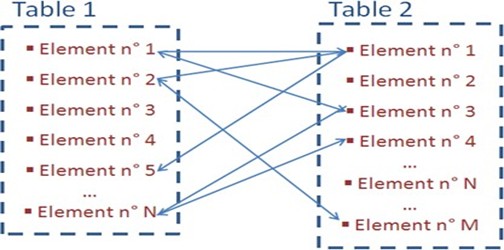
Traceability-linked tables are of type N-M, i.e. the form can be linked to several records in the traceability-linked table. In the example of tables 1 and 2 below, we have N elements in table 1 that can be linked to M elements in table 2.
You’ll find the functions corresponding to Links in the section to the right of a form.
Create and link

If you wish to link to a form a record that does not yet exist in the linked table, click on the “Add” button.
The associated table form opens, allowing you to enter data in the fields and click on the “Create” button. The new record is linked directly to the form, and a counter next to the table name increments in blue (+1).
A message at the top of the screen confirms that the recording has been created. To view the created item, click on the blue account.
Link

If the record you wish to link already exists in the linked table, click on the “Link” button. the linked table grid opens.
Use the keys to select/deselect one or more recordings:
- Ctrl + A: selects all records ;
- Ctrl + shift + click: selects all records between the first and second click;
- Ctrl + click: selects multiple records.
Once you’ve selected the records to link, click on the “Link” button. A message in the top left-hand corner of the screen confirms each modification made as a result of the link.
Records are linked to the form, and a counter next to the table name increments, corresponding to the number of links.
Unlink

When a form is open for viewing/editing, the “unlink” button is active when a record is linked. Click on the “unlink” button, and the linked table grid opens.
Select one or more records to unlink and click on the “Unlink” button.
Edit

The “Edit” button is used to modify the content of linked records, depending on rights. Clicking on this button opens the bottom tab with the record information.